离线版nrfutil工具安装方法

简介

nrfutil 是 Nordic 提供的命令行工具集,支持以下功能:

  • 基于 JLink 的固件烧录、读取、flash 擦除、recover
  • 基于 MCUboot 的固件升级(DFU)
  • 基于 nRF5 bootloader 的固件升级(DFU)
  • 其他功能(Trace、工具更新等)

地址里除了 nrfutil 本身的下载链接,还有一些依赖软件的链接,以及软件的说明。一定要仔细阅读。下载完毕后可以添加到 PATH 环境变量,方便使用。

首次运行

下载好 nrfutil 的可执行文件,以及它的各种依赖软件后,就可以运行。为了方便使用,记得添加到 PATH 环境变量。

如果你的电脑可以**科学上网**,那么可以直接运行成功。首次运行时,会连接到 raw.githubusercontent.com 去获取最新的工具软件列表,然后下载对应操作系统的工具。但这个网站在国内通常无法直接访问,运行会报以下错误:

1
2
3
4
5
6
7
8
9
10
11
12
13
14
nrfutil.exe
Error: Failed to bootstrap core functionality before executing command.

HTTP request to default bootstrap resource

https://raw.githubusercontent.com/NordicSemiconductor/nrfutil-package-index/master/bootstrap.json

failed.

Please check that your internet connection is functioning. If you use a proxy, please try the --detect-proxy flag or
manually set the appropriate HTTP_PROXY-style environment variable(s).

To use a custom bootstrap config, set NRFUTIL_BOOTSTRAP_CONFIG_URL. To bootstrap directly from a nrfutil-core package
tarball, set NRFUTIL_BOOTSTRAP_TARBALL_PATH.

通过阅读输出日志,我们可以知道,如果想设置自己的工具软件列表,需要设置 NRFUTIL_BOOTSTRAP_CONFIG_URL 环境变量。

我们先用一台可以**科学上网**的电脑访问一下日志中提到的无法访问的网址,可以看到这个 JSON 文件的内容:

1
2
3
4
5
6
7
8
{
"nrfutil_core_tarball_urls": {
"aarch64-apple-darwin": "https://developer.nordicsemi.com/.pc-tools/nrfutil/nrfutil-aarch64-apple-darwin-7.6.0.tar.gz",
"x86_64-apple-darwin": "https://developer.nordicsemi.com/.pc-tools/nrfutil/nrfutil-x86_64-apple-darwin-7.6.0.tar.gz",
"x86_64-pc-windows-msvc": "https://developer.nordicsemi.com/.pc-tools/nrfutil/nrfutil-x86_64-pc-windows-msvc-7.6.0.tar.gz",
"x86_64-unknown-linux-gnu": "https://developer.nordicsemi.com/.pc-tools/nrfutil/nrfutil-x86_64-unknown-linux-gnu-7.6.0.tar.gz"
}
}

原来这里记录了各个操作系统平台下,最新版工具压缩包(tarball)的下载地址。

那么我们可以根据链接,下载自己操作系统对应的压缩包,存放到电脑本地。然后根据日志的提示,直接设置 NRFUTIL_BOOTSTRAP_TARBALL_PATH 临时环境变量,将其设置为压缩包在本地的绝对路径。

1
2
3
4
5
6
7
8
9
10
11
12
13
14
15
16
17
18
19
20
21
22
23
24
25
26
27
28
29
30
31
32
33
34
PS C:\software> $env:NRFUTIL_BOOTSTRAP_TARBALL_PATH="C:\Software\nrfutil-x86_64-pc-windows-msvc-7.6.0.tar.gz"

PS C:\software> .\nrfutil.exe
nrfutil

Usage:
nrfutil [+MODIFIER] [OPTIONS] [SUBCOMMAND]

Options:
--log-level <LOG_LEVEL> Set the maximum log level [env: NRFUTIL_LOG=] [possible values: off, error, warn, info,
debug, trace]
--log-output <LOG_OUTPUT> Set log output type: --log-output=stdout --log-output=file ... [possible values: file,
stdout]
--json Print output in a JSON Lines format
--json-pretty Print output as formatted JSON
--skip-overhead Skip all message overhead when in JSON output mode, outputting only the data part of
"info" messages and ignoring the rest
--changelog Print the latest changelog entry
--changelog-full Print the full changelog
-V, --version
--help-extended Show comprehensive documentation
--license Show license information for in-built dependencies
--detect-proxy Invoke libproxy's 'proxy' utility program to retrieve proxy server info and use it
-h, --help Print help (see more with '--help')

Built-in nrfutil commands (see installed commands with `list`):
help Show comprehensive documentation
install Download and install nrfutil commands
upgrade Upgrade nrfutil commands to the latest version
uninstall Uninstall nrfutil commands [aliases: remove]
prepare-offline Prepare local package and resource repositories for offline installs of nrfutil commands
search Search for installable nrfutil commands in the package index
list List installed nrfutil commands
self-upgrade Upgrades the nrfutil core functionality to the latest version
然后就可以看到 nrfutil 可以正常运行了。

注意:

  • Windows 平台请使用 PowerShell,而非 cmd
  • 其他平台请使用对应的设置临时环境变量的方法
  • 只有第一次运行时才需要设置这个环境变量
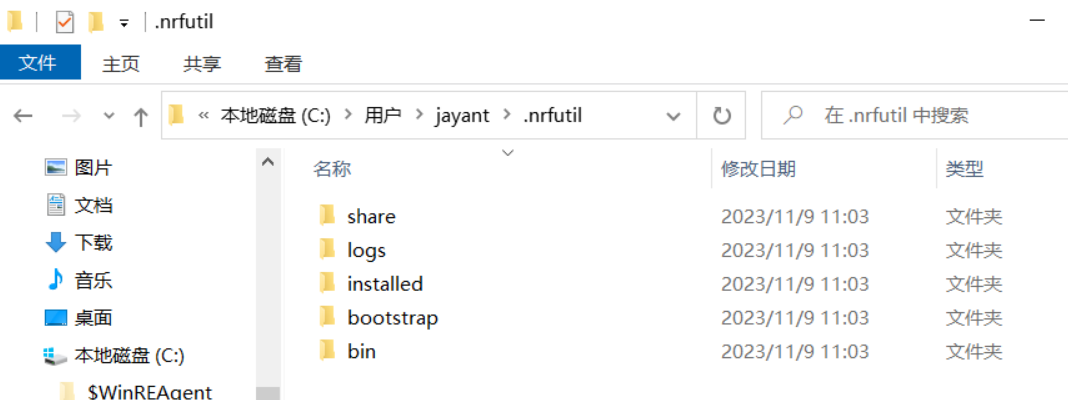
  • 第一次运行成功后,会在 ${HOME}/.nrfutil 隐藏文件夹内保存这些信息,后续都可以直接执行 nrfutil,不需要网络和这个临时环境变量
    image

安装子命令

查看有哪些子命令可安装(需网络):

1
2
3
4
5
6
7
8
9
PS C:\> nrfutil search
Command Installed Latest Status
ble-sniffer 0.12.0 0.12.0 Installed
completion 1.4.0 1.4.0 Installed
device 2.1.1 2.1.1 Installed
npm 0.3.0 0.3.0 Installed
nrf5sdk-tools 1.0.1 1.0.1 Installed
toolchain-manager 0.14.1 0.14.1 Installed
trace 2.1.0 2.1.0 Installed

安装想要的子命令(需网络):

1
nrfutil install nrf5sdk-tools

工具包离线导出与导入

在首次安装之后,我们可以用能联网的电脑下载、更新一些新的工具。这些工具就存放在用户目录的 .nrfutil 中。

如果想拷贝到不能联网的电脑中,就可以导出到 U 盘,再从 U 盘导入到电脑里。

导出到 U 盘:

1
nrfutil prepare-offline E:/nrfutils

从 U 盘安装想要的子命令:

1
nrfutil install nrf5sdk-tools --from-offline E:/nrfutils

其他推荐阅读

nrfutil 博客:https://devzone.nordicsemi.com/nordic/nordic-blog/b/blog/posts/nrf-util-unified-command-line-utility

nrfutil 文档:https://docs.nordicsemi.com/bundle/nrfutil/page/README.html


离线版nrfutil工具安装方法
https://jayant-tang.github.io/2023/11/b3ef0c412298/
作者
Jayant Tang
发布于
2023年11月9日
许可协议